TL;DR
This is a healthcare workflow story, not an AI hype story.
In 2021, I worked as a Business Analyst who later moved into Product Owner responsibilities on a clinical-trial platform team of around 10 people. Our US-side stakeholders were in Seattle, including medical researchers and hospital-facing clinical personnel. The biggest pain was not “no OCR feature.” The real pain was fragmented workflow: users had to capture documents, use external tools, correct text manually, then re-upload and re-verify in our system.
We shipped OCR-assisted document handling inside the platform with mandatory human verification checkpoints. Across three major customers, our internal measurement indicated about 20% productivity improvement for doctor-facing and medical-worker workflows. The gain came from reducing context switching and transfer friction, not from replacing human judgment.
The core lesson I carry into healthcare, pharma, and regulated transformation work in Germany is simple: automation only creates value when process clarity, compliance boundaries, and quality controls are designed together.
Why This Case Matters
Healthcare product work punishes shallow thinking. If your workflow is ambiguous, clinicians lose time. If your data quality is unstable, patient-facing outcomes are delayed. If your compliance interpretation is weak, trust breaks quickly.
At Talosix, public product pages describe a clinical-trial operations stack that includes trial workflows, data collection, and integrated study operations [R1][R2]. In archived 2021 snapshots, the platform messaging already emphasized healthcare data operations and real-world evidence orientation [R3].
My contribution happened in that operating reality: practical workflow digitization in a sensitive environment, under HIPAA and GDPR expectations [R4][R5].
The Real Bottleneck Before OCR Support
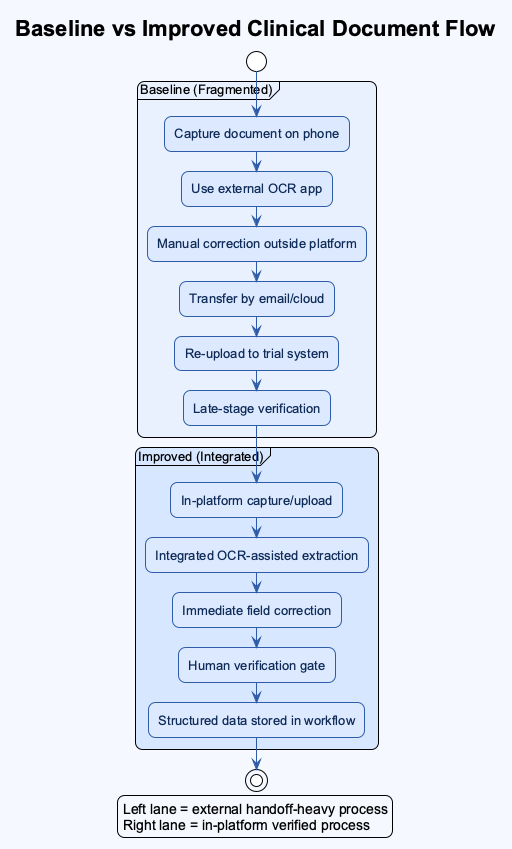
Before OCR support was integrated into our workflow, users often did this:
- Capture or scan paperwork on a phone or separate device.
- Use an external OCR app or tool.
- Correct extraction errors manually.
- Transfer files or text via email, cloud share, or local handoff.
- Upload again into our platform.
- Re-check fields in the trial workflow.
This sounds manageable in a demo. In production, it is exhausting. Each handoff increases risk: naming mistakes, wrong file version, delayed follow-up, and duplicated work.
The important point is that OCR was only one piece. The larger value came from reducing cross-tool workflow fragmentation.
Project Context
What I can state from direct experience:
- Role progression: Business Analyst to Product Owner responsibilities.
- Team size: around 10.
- Collaboration model: technical team plus US-side clinical and product stakeholders in Seattle.
- Product environment: clinical-trial workflow platform with patient management, forms, document handling, login/logout tracking, and scheduling/booking flows.
- Time window: active full-time delivery period around 2021.
What is publicly verifiable:
- Talosix operates in clinical trial and study workflow software [R1][R2].
- Talosix has policy language tied to healthcare data operations and clinical-study context [R6].
Baseline vs Improved Workflow
The most useful way to explain impact is operationally.
| Workflow Stage | Baseline (Before Integrated OCR Support) | Improved State (After Integration + Verification Loop) | Why It Matters |
|---|---|---|---|
| Document intake | External scan/OCR tools, then upload | In-platform capture/upload path | Fewer context switches |
| Data extraction | Manual conversion and copy/paste | Assisted extraction with in-flow review | Less repetitive work |
| Error handling | Late discovery after transfer | Immediate field-level correction | Faster correction cycle |
| Team coordination | More email/device handoff | More direct system-side handling | Lower communication overhead |
| Quality control | Ad hoc review | Required human verification gate | Safer data quality |
Internal result from our project period: about 20% productivity gain observed across three major customers, primarily from reduced transfer friction and faster correction cycles.
Implementation Approach: What Actually Worked
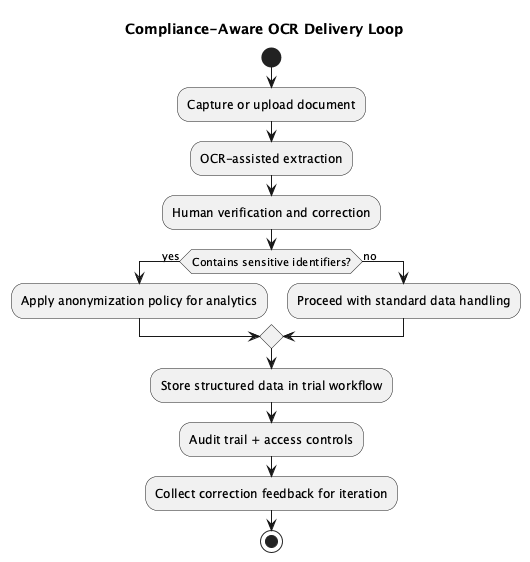
We did not frame OCR as “magic.” We framed it as one controlled step inside a compliance-aware workflow.
1. Map the Full Document Journey
We first mapped where the true friction lived: intake, extraction, correction, review, and submission. Without this map, feature debates were vague.
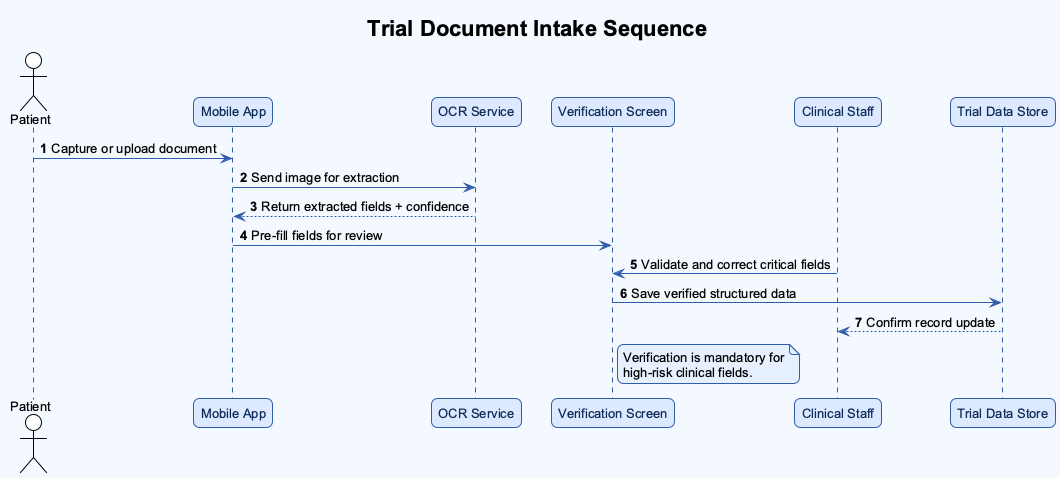
2. Keep Human Verification Mandatory
Because OCR quality in 2021 was still imperfect for many clinical documents, we kept a final human confirmation checkpoint. This protected quality and generated useful feedback signals for iterative model and rule improvements.
3. Learn From Correction Data
Human fixes were not treated as “failure.” They were treated as structured learning input to improve future extraction behavior.
4. Design With Compliance Boundaries
We worked with HIPAA and GDPR expectations in mind. One practical design direction was anonymization for sensitive user data in analytic contexts, reducing unnecessary exposure of personal identifiers while still allowing operational insight.
Compliance-Aware Delivery Loop
Timeline: From Friction to Stable Use
| Period | Reality on the Ground | Delivery Focus |
|---|---|---|
| Early phase | Heavy cross-tool scanning and manual text correction | Workflow mapping and pain-point validation |
| Build phase | Initial OCR demos looked promising but incomplete | PRD refinement with clinical and product stakeholders |
| Review phase | Stakeholders surfaced additional compliance and usability needs | Iterative requirement expansion, not one-shot release |
| Rollout phase | Assisted extraction became usable with human verification | Adoption with safety guardrails |
| Stabilization | Teams used correction feedback to improve behavior over time | Ongoing quality and productivity tuning |
The Mistake That Taught Me the Most
My biggest early assumption was thinking that a successful OCR demo would lead to fast stakeholder approval.
It did not.
After rollout discussions started, new requirements appeared quickly, especially around compliance interpretation, workflow edge cases, and practical clinical usability. At that time, I was relatively junior in healthcare domain depth, so I underestimated how much context was required before a “good technical demo” becomes an acceptable production feature.
That was a turning point for me. I learned to front-load research, ask better domain questions earlier, and treat regulated workflow design as a multi-iteration negotiation, not a one-pass specification.
What Daily Reality Felt Like During Delivery
Let me make this more concrete because this is the part hiring managers usually care about the most. What did the team actually do from Monday to Friday?
We were not sitting around discussing “AI strategy” in abstract slides. We were dealing with document quality variance, staff workload variance, and requirement variance at the same time. One site could upload relatively clean paperwork while another site sent low-light photos with skewed angles and partial shadows. One user flow could complete in minutes, while another could stall because one required field was ambiguously interpreted. Did we have perfect control over these inputs? No. Did we still have to deliver a reliable workflow? Yes.
This is where I learned to separate product optimism from operational truth. A demo can look beautiful, but can that same flow survive Friday evening traffic and Monday-morning clinical pressure? Can it survive mixed device quality? Can it survive handovers between medical workers who are already overloaded? Can it survive a compliance review when someone asks why a data field changed after first submission? These are not theoretical questions. They are production questions.
From the BA side, I translated field pain into requirement language. From the PO side, I prioritized which fixes protected workflow stability first. That often meant saying “not yet” to flashy additions and saying “yes now” to boring but high-impact controls: clearer validation states, better correction visibility, predictable review sequencing, and explicit ownership for exception paths.
I also learned how quickly trust can be lost in healthcare workflows. If users feel the system is uncertain, they will build their own side workflow outside your platform. Then what happens? You lose traceability, data quality drifts, and adoption weakens. So we kept asking: where are users silently compensating for our product gaps? What are they doing outside the system that should happen inside the system? Which “small friction” today becomes serious process debt in three months?
Was everything solved by one release? Of course not. Could I be wrong on some fine-grained recall of sequence details from that period? Possibly, and I want to state that clearly. But the pattern is solid: workflow clarity plus controlled automation plus human verification produced measurable productivity improvements while preserving quality discipline.
And this matters for Germany-facing healthcare and pharma transformation roles. Why? Because the same pattern repeats in regulated environments: people do not reward feature theater. They reward reliability, accountability, and systems that reduce cognitive load without hiding risk.
Failure-Cost Ledger
| Assumption | Cost | Fix |
|---|---|---|
| “A working OCR demo is enough for approval.” | Rework cycles due to late-emerging requirements | Earlier compliance and stakeholder scenario mapping |
| “Extraction quality alone defines success.” | Missed workflow friction outside OCR step | End-to-end workflow optimization focus |
| “Technical team can infer clinical nuance from feature descriptions.” | Clarification overhead and alignment delays | Tighter PRDs with explicit clinical context and decision rules |
What I Would Do Differently Now
If I rebuilt this from day one, I would do three things earlier:
- Run a compliance-workflow pre-mortem before first demo.
- Define a formal correction taxonomy so feedback loops are analytically clean.
- Create explicit acceptance scenarios with clinical staff before implementation starts, not after.
Germany-Facing Relevance
For healthcare, pharma, and regulated digital transformation roles in Germany, this case demonstrates transferable behavior:
- I can move across domains quickly while respecting high-risk constraints.
- I can translate stakeholder language into buildable requirements.
- I focus on operational reliability, not only UI polish.
- I can ship workflow improvements that balance speed, quality, and compliance.
I have worked in both healthcare and legal-regulated contexts, and that shaped my execution style: careful, process-conscious, and accountable under pressure.
Reflection: What This Changed in My Product Mindset
Before this project period, I thought speed mostly meant implementation speed. After this project, I define speed differently: speed is the rate at which a cross-functional team can move without breaking trust.
What does that mean in practice?
- You can ship fast and still be reckless.
- You can ship carefully and still be slow if your workflow is unclear.
- The real target is disciplined velocity.
In healthcare operations, disciplined velocity requires explicit design for uncertainty. When extraction confidence is weak, the system must say so. When a field is corrected, the system must preserve traceability. When a user is unsure, the UI must guide review order instead of forcing guesswork.
This is why I now ask more questions earlier in every project: where can data drift? who owns correction decisions? what is the safe fallback when automation confidence is low? which metrics indicate true operational gain, not vanity gain? how will we explain this behavior to compliance or audit stakeholders six months later?
Those questions changed how I build PRDs, how I run stakeholder reviews, and how I prioritize backlog items. They also changed how I evaluate myself. I do not only ask “Did we launch?” I ask “Did we reduce friction while protecting quality?” and “Can the process hold when pressure increases?”
Deep Dive: Document Variability and Why Generic OCR Thinking Fails
One thing that is easy to underestimate in healthcare is document variability. In normal product conversations, people say “document” as if it is one thing. In reality, our workflow touched multiple document families with different visual structures, data density, and risk profiles.
- Discharge notes can be semi-structured and clinically dense.
- Insurance paperwork can be heavily templated but still inconsistent across sources.
- Registration forms may look simple but carry identity-critical fields.
- Clinical trial forms can include protocol-sensitive values where a small extraction error creates larger downstream confusion.
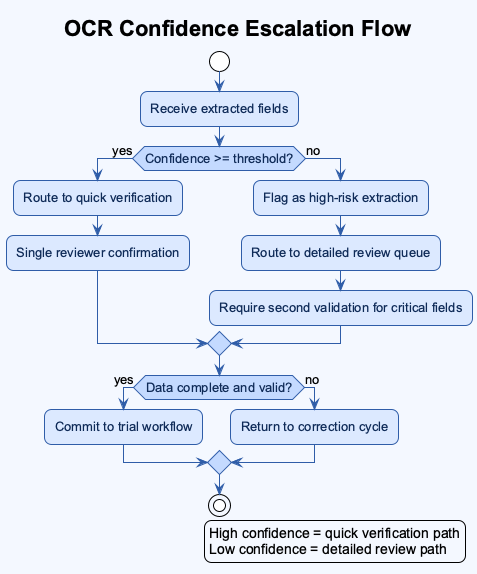
So the key question becomes: should every document go through the same extraction confidence threshold? Usually no.
We had to think in tiers. Lower-risk fields could accept assisted extraction with standard review. Higher-risk fields required stronger confirmation behavior and clearer UI prompts for manual validation. Why does this matter? Because users do not review all fields with equal attention when they are under time pressure. Product design must guide attention, not assume perfect attention.
Another practical issue was source quality. Some uploads were crisp exports. Others were photos captured in difficult lighting, with perspective distortion, partial shadows, or handwritten notes. If you ignore this variability, your metrics can mislead you. You might think extraction quality is “good enough” overall while specific high-risk scenarios are failing repeatedly.
For that reason, I prefer workflow metrics that combine accuracy context with correction behavior. Instead of only asking “What was extraction accuracy?” I also ask:
- Which fields were corrected most often?
- Which correction types repeated by site or document type?
- How long did correction loops take per case?
- At which step did users abandon or defer completion?
Those signals are operationally useful because they connect model behavior to user workload and process stability.
I may be wrong on exact micro-metric values from memory today, but I am confident about the direction: the biggest productivity gains appeared when we reduced repetitive correction loops and clarified verification ownership.
Stakeholder Alignment Playbook I Used
The cross-functional part of this project deserves explicit mention because this is where many healthcare transformation efforts stall.
The US-side stakeholders had frontline clinical and research context. Our technical team had implementation constraints and delivery pressure. My role sat in between. To prevent misalignment, I used a practical requirement framing pattern:
- Problem statement in workflow language, not tool language.
- Failure mode examples from real usage patterns.
- Data-handling constraints tied to compliance expectations.
- Acceptance criteria that included both speed and quality gates.
- Open questions list with owner names and decision deadlines.
This sounds basic, but it helped a lot. Why? Because each stakeholder group could see their concerns represented in one artifact instead of debating separate interpretations.
For example, when discussing anonymization and analytics utility, we did not frame it as a legal checkbox only. We framed it as dual-value design:
- protect personally identifiable information under risk scenarios
- preserve enough structured signal for demographic or geographic analysis
That framing reduced resistance because it aligned safety and business utility.
I also learned that requirement documents should include explicit “known unknowns.” In regulated projects, pretending certainty is expensive. Stating uncertainty early allows better sequencing and better expectation management. This became one of my strongest habits later in legal and cross-domain product work.
FAQ
Q1: Was the 20% productivity improvement only because OCR became better? A1: No. OCR quality contributed, but the bigger gain came from workflow integration. Users no longer had to jump across multiple tools, transfer files manually, and reconcile versions repeatedly.
Q2: Did you remove human checks to move faster? A2: No. We kept human verification as a mandatory quality gate. The goal was assisted speed with controlled risk, not blind automation.
Q3: What did compliance change in product decisions? A3: It changed requirement depth. We had to define anonymization boundaries, review traceability, and acceptable handling patterns under HIPAA/GDPR expectations.
Q4: What was your hardest personal challenge in this project? A4: Domain depth. I was still growing in healthcare and compliance context, so I had to learn quickly, ask better questions, and rely on strong collaboration with product and clinical stakeholders.
Q5: What would you do first if you repeated this project now? A5: I would start with a compliance-workflow pre-mortem and explicit exception scenarios before demoing extraction performance.
Additional Workflow Diagrams
Baseline vs Improved Clinical Document Flow
Trial Document Intake Sequence
OCR Confidence Escalation Flow
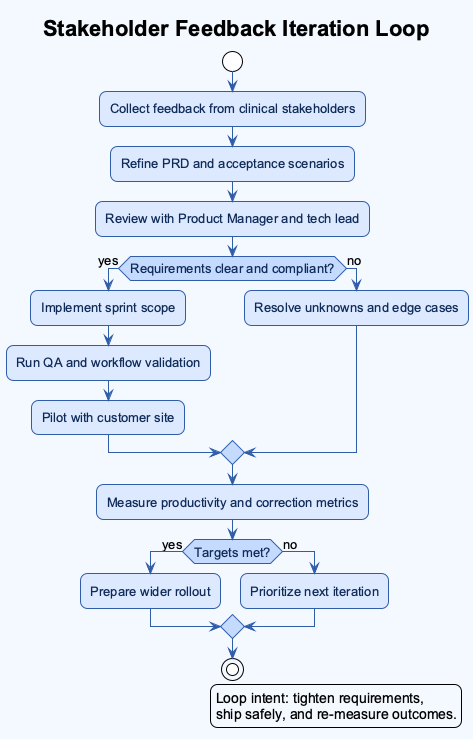
Stakeholder Feedback Iteration Loop
Closing
If a hiring manager reads this fast, I want one conclusion to remain:
I am a multi-domain product professional who learns new regulated environments quickly, translates complexity into practical workflows, and ships carefully designed systems that improve productivity without compromising quality.
References
[R1] Talosix. (n.d.). Product. Retrieved March 22, 2026, from https://www.talosix.com/product
[R2] Talosix Help Center. (n.d.). Data collection and analysis features. Retrieved March 22, 2026, from https://help.talosix.com/en/article/data-collection-and-analysis-features
[R3] Talosix (archived). (2021, April 18). Homepage snapshot. Internet Archive Wayback Machine. Retrieved March 22, 2026, from https://web.archive.org/web/20210418145309/https://www.talosix.com/
[R4] U.S. Department of Health and Human Services. (n.d.). HIPAA for professionals. Retrieved March 22, 2026, from https://www.hhs.gov/hipaa/for-professionals/index.html
[R5] European Union. (2016). Regulation (EU) 2016/679 (General Data Protection Regulation). Retrieved March 22, 2026, from https://eur-lex.europa.eu/eli/reg/2016/679/oj
[R6] Talosix. (2021, February 19). Privacy policy. Retrieved March 22, 2026, from https://www.talosix.com/privacy
Related reading
- How I owned the project management tool transition at Anduin Transaction.
- 30 Months, 1 Mammoth Audit Log, and Why Investor Onboarding in Private Markets Isn’t Just Another “Signup Flow”
- The 6 Phases of IT Projects
Image Disclosure
If AI-generated images are used for this post, each generated image must be explicitly labeled in its caption as AI-generated. If real photos are used, captions should state they are real photos.